
From a recording to a follow-up you can trust.
Follow the steps through real screenshots, read the sample script and see what we checked before turning Fireflies’ notes into an action list.
1. Start with a meeting you can safely test
Our fictional business, Harbour Repairs, is updating its booking page. Sam agrees to send a draft. Priya agrees to review it without accepting a deadline. Alex offers a screenshot, but only if a test account is ready. A promotional video is suggested and explicitly not approved.
These details give us something specific to check: can we still tell an agreed task from an idea, a missing date or a conditional promise?
Read the original test script
The test used one synthetic narrator reading every contribution, including the names. You can inspect the complete script below and compare it with the actual Fireflies results.
Read the complete fictional script
AI Utility demonstration: fictional project update

This is a fictional project update created by AI Utility for a Fireflies demonstration. It uses one synthetic narrator reading named contributions, not a recording of real participants. The meeting date is 6 November 2026.

Sam says: We are planning a small website update for Harbour Repairs. The aim today is to agree the next steps. We are not changing our prices.

Priya says: The booking instructions need to be clearer. Customers can request a preferred day, but the booking is only confirmed when we email them. Please keep that condition in the new wording.

Sam says: I will send the revised booking-page draft to Priya by 10 November 2026. I will include the email-confirmation condition and leave the current prices unchanged.

Priya says: I will review Sam's draft, but I cannot agree a deadline until I know my workload. Please mark my review date as not agreed.

Alex says: What about making a thirty-second promotional video? It could explain how booking works. That is only an idea. We have not approved the video or assigned anyone to make it.

Sam says: Agreed. Keep the video as an open suggestion, not an action item. We also need a screenshot of the booking form.

Alex says: I can send a screenshot by 11 November 2026 if the test account is ready. It must use dummy customer details. If the account is not ready, I will tell Sam; I cannot promise the screenshot date without it.

Priya says: We should check the appointment capacity before publishing, but we have not assigned that check to anyone yet.

Sam says: To confirm, our decision is to keep the existing prices. My action is to send the draft by 10 November. Priya will review it with no agreed date. Alex's screenshot depends on the test account being ready. The video is not approved, and the capacity check still needs an owner. That is the end of this fictional demonstration.
2. Upload the recording to Fireflies
- Review your meeting settings. In this account we chose “Only when I invite fred@fireflies.ai” and sent recaps only to ourselves. We did not need to invite the bot into a live call for this upload test.
- Open the upload area. We selected Upload File from Home, then Browse Files. The app noted that uploads were moving to Meetings, so the navigation may differ in your account.
- Choose the file and language. We selected harbour-repairs-demo.wav, kept English (Global), then selected Upload.
- Wait for processing. The file first showed “Processing transcript”. Once ready, we used Details and opened the recording title to see its notes and transcript.
Our account began with three free meeting credits and showed one remaining after two uploads. We declined the card-required trial. That describes this account on the test date, not a promise of a particular allowance for every visitor.
Why we tried two recording lengths
Our first recording was 2:19. Fireflies’ upload documentation says recaps require recordings longer than three minutes, so we also uploaded the same script read more slowly at 3:10. In this account, both recordings produced notes and action items. The screenshots below are from the 3:10 version. Check your own account’s limits rather than relying on our short-file result.
For current upload formats, limits and navigation, see the official upload instructions. For automatic joining, see Fireflies’ meeting settings guide.
3. Open the transcript alongside the notes
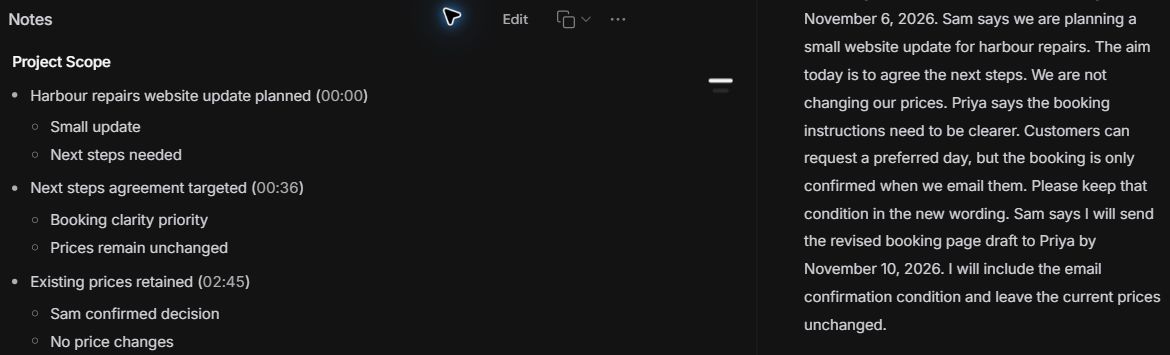
Fireflies displayed the recording, organised notes and a separate Transcript tab. In the passages we checked, the transcript retained the draft date, Priya’s missing deadline, the screenshot dependency and the unapproved video suggestion. It labelled the recording “Speaker 1”, which fits our single-narrator input.
The notes preserved useful distinctions
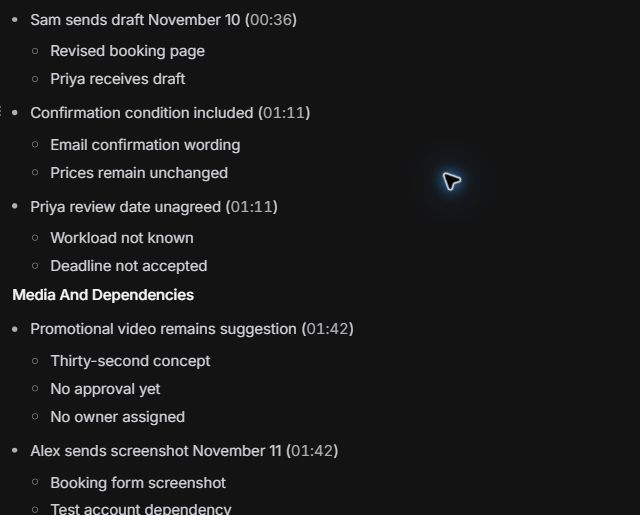
The detailed notes recorded Priya’s review date as unagreed and the video as a suggestion with no approval or owner. They also recorded the test-account dependency for Alex’s screenshot. That makes the notes a useful place to look beyond the short action list.
The action list was a starting point, not the finished follow-up
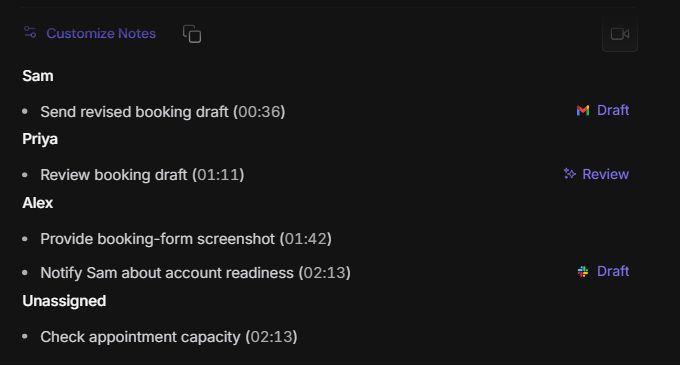
Fireflies produced five action items: Sam’s draft, Priya’s review, Alex’s screenshot, an account-readiness update from Alex, and an unassigned capacity check. The shorter entries did not repeat all the dates and conditions present in the detailed notes.
4. Check the details before assigning work
We compared the output with the script written before the upload. Here is the review that turns the generated list into something a team could use.
On a phone, swipe the table sideways to read all three columns.
| What the script said | What Fireflies showed | What to do before sharing |
|---|---|---|
| Sam sends the draft by 10 November 2026. | The notes kept November 10; the action item just said to send the draft. | Add the full deadline and recipient to the final task. |
| Priya will review; no date agreed. | The notes kept the missing deadline; the action item named the review. | Write “Not agreed” for the deadline. Ask Priya to confirm it. |
| Alex sends a screenshot by 11 November only if the test account is ready. | The notes recorded the date and dependency. The short screenshot action omitted both. | Keep the date conditional and specify dummy customer details. |
| Alex tells Sam if the account is not ready. | A separate action said to notify Sam about account readiness. | Preserve the original condition instead of treating this as an unconditional extra task. |
| A video is an unapproved idea. | The notes kept it as a suggestion; it did not appear in the action list. | Leave it in open suggestions, not assigned work. |
| The capacity check has no owner. | The task appeared under “Unassigned”. | Ask the team to choose an owner; do not silently assign it. |
The checked follow-up
Sam: Send the revised booking-page draft to Priya by 10 November 2026. Keep the existing prices and the email-confirmation condition.
Priya: Review the draft. Deadline: not agreed.
Alex: Supply a booking-form screenshot using dummy details by 11 November 2026, if the test account is ready. Tell Sam if it is not ready; the screenshot date is conditional.
Needs an owner: Check appointment capacity before publishing. Owner and date still need agreement.
Decision: Existing prices stay unchanged. Open suggestion: A promotional video; not approved or assigned.
This final follow-up is our checked version based on the original script. It is not an unedited Fireflies export.
Use the free follow-up worksheet →5. Is Fireflies worth trying for this task?
What worked in this example
- The upload became a readable transcript and organised notes.
- The notes retained missing dates and conditional commitments.
- Tasks were grouped by named people, with the ownerless check left unassigned.
- The unapproved video idea stayed out of the action list.
What still needed a person
- The short tasks needed deadlines and conditions restored.
- The account-readiness task needed its original condition.
- Someone still had to agree Priya’s deadline and assign the capacity check.
- We had to check the original script instead of assuming the summary was complete.
Our view: Fireflies is worth exploring if you regularly need to revisit recordings and turn discussions into follow-ups. This example shows a useful starting point for that work, with a review step before anything is assigned or sent. For a short meeting that already has clear typed notes, your existing process and our worksheet may be enough.
About this demo: We tested Fireflies with a fictional recorded meeting. Results will vary with audio quality and the conversation, so review the notes before sharing them.
Before subscribing: Check that your chosen plan includes the features and usage allowance you need.
Want the reusable checking method? Read our meeting-notes-to-actions guide, or use the AI tool chooser for a different task.